Geomechanics.io

  • Free Tools
Sign UpLog In
AllGeotechnicalMiningInfrastructureMaterialsHazardsEnvironmentalSoftwarePolicy

Geomechanics.io

Geomechanics, Streamlined.

© 2026 Geomechanics.io. All rights reserved.

Geomechanics.io

CMRR-ioGEODB-ioHYDROGEO-ioQCDB-ioFree Tools & CalculatorsBlogLatest Industry News

Industries

MiningConstructionTunnelling

Company

Terms of UsePrivacy PolicyLinkedIn
    Projects
    Product

    Support Designer in Slide2: target FoS support design explained for engineers

    May 26, 2026|

    Reviewed by Joe Ashwell

    Support Designer in Slide2: target FoS support design explained for engineers

    First reported on Geoengineer.org – News

    30 Second Briefing

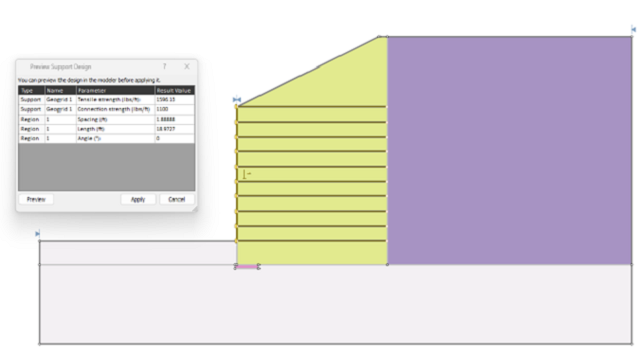
    Rocscience has launched Support Designer in Slide2, allowing engineers to specify a target factor of safety for slope or excavation models and automatically compute required support parameters such as bolt length, spacing, and capacity. The tool works with limit equilibrium analyses, adjusting support patterns to meet user-defined FoS rather than relying on manual trial‑and‑error iterations. This shift to target‑driven design could tighten geotechnical optimisation workflows, particularly for complex reinforced slopes, retaining structures, and underground excavations.

    Technical Brief

    • Support Designer operates directly on Slide2 models containing existing support types, geometries and stratigraphy.
    • It handles multiple support systems concurrently, including rock bolts, soil nails, geosynthetics and structural liners.
    • Users can constrain design by maximum bolt length, minimum spacing, or allowable support capacity ranges.
    • Existing support layouts can be locked, with optimisation restricted to selected support sets or regions.
    • Output includes updated support patterns plus revised critical slip surfaces and governing failure mechanisms.
    • Designers can rapidly compare alternative reinforcement strategies by cloning scenarios and re‑running automated support searches.
    • Workflow is intended for both slope and excavation geometries, including complex staged construction sequences.
    • For portfolios with many Slide2 models, automated support sizing reduces manual iteration time across design options.

    Geotechnical Software for Modern Teams

    Centralise site data, logs, and lab results with GEODB-io, CMRR-io, and HYDROGEO-io.

    No credit card required.

    • Save and export unlimited calculations
    • Advanced data visualisation
    • Generate professional PDF reports
    • Cloud storage for all your projects

    Prepared by collating external sources, AI-assisted tools, and Geomechanics.io’s proprietary mining database, then reviewed for technical accuracy & edited by our geotechnical team.

    Related Articles

    Kilmac goes full Trimble: connected survey workflow lessons for civils teams
    Software
    3 days ago

    Kilmac goes full Trimble: connected survey workflow lessons for civils teams

    Kilmac has standardised its survey operations on Trimble, buying six SPS720 total stations, six R780 GNSS rovers and six TSC710 data collectors with Siteworks from Sitech to complement its existing on-machine systems. The fully connected Trimble Civil Construction Technology ecosystem, managed through Trimble Business Centre and Works Manager, links office, field and plant for precision earthmoving and reduced rework on multi-phase civils and groundworks. The setup is already deployed on the £76m Clackmannanshire Wellbeing Hub and Lochies school project in Scotland, due to complete in late 2027.

    Workday Learning with Sana: training and safety takeaways for mine operators
    Software
    4 days ago

    Workday Learning with Sana: training and safety takeaways for mine operators

    Workday has released Workday Learning, powered by Sana, an AI-native training platform that combines Workday’s existing HR and skills datasets with Sana’s generative tools to personalise learning pathways for mining workforces. The system can auto-generate course content, assessments and microlearning from existing policies, SOPs and technical documents, while tracking role-specific competencies such as equipment operation, safety procedures and regulatory compliance. For mine operators, this offers a way to standardise training across sites, shorten onboarding and keep skills matrices current without manual content development.

    Datamine 2026 software advances: integration and planning gains for mine engineers
    Software
    9 days ago

    Datamine 2026 software advances: integration and planning gains for mine engineers

    Datamine has released 2026 upgrades across its mining software suite, tightening data flow between exploration, geology, mine planning, laboratory information management and production control. Key advances include deeper integration between Studio RM resource modelling, Studio OP/UG mine design, Fusion LIMS and the Minemax scheduler, plus improved interoperability with fleet management and plant control systems via standardised APIs. For engineers, the changes aim to cut manual data handling in block model updates, short-interval control and grade reconciliation, and to support more consistent multi-mine planning workflows.

    Related Industries & Products

    Construction

    Quality control software for construction companies with material testing, batch tracking, and compliance management.

    Mining

    Geotechnical software solutions for mining operations including CMRR analysis, hydrogeological testing, and data management.

    QCDB-io

    Comprehensive quality control database for manufacturing, tunnelling, and civil construction with UCS testing, PSD analysis, and grout mix design management.